
Building a Resilient In-House CBT Center for Nigerian Secondary Schools
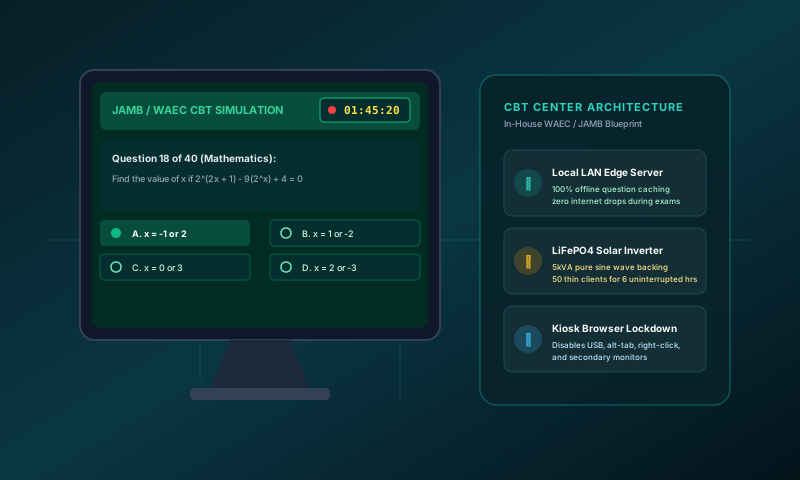
The Growing Urgency of School-Owned CBT Laboratories
With JAMB UTME exclusively administered on computers and WAEC actively expanding its Computer-Based Testing (CBT) modules for objective subjects, Nigerian secondary schools can no longer treat computer laboratories as optional showpieces. Yet, hundreds of schools that attempt to run in-house mock tests and terminal examinations face catastrophic failures: loading spinners that freeze mid-exam, routers crashing under 40 simultaneous connections, and voltage fluctuations from diesel generators that reboot client monitors mid-session.
Building an exam-ready CBT center does not require millions in enterprise enterprise fiber or expensive Core i7 workstations. It requires resilient local architecture tailored specifically for the Nigerian infrastructural environment.
1. The Architecture of Offline CBT: Local Server vs. Live Internet
The single greatest operational mistake school owners make is attempting to connect 50 computers to an internet hotspot during an examination. When 50 browsers simultaneously request question banks and image diagrams from a cloud server, the cell tower near the school becomes congested within minutes.
The solution is Local Edge Caching. In this architecture:
- A single moderately powered master computer (the local test server) hosts the exam database in the school's administrative office.
- Candidate computers connect strictly over a local Gigabit Switch via CAT6 ethernet cables or a closed local Wi-Fi router.
- No candidate workstation connects to the public internet during the test.
- When candidates submit, their answers are committed locally to an encrypted SQLite database on the local server in 12 milliseconds. Once the exam window closes, the master server syncs the consolidated broadsheet to the cloud in one 50KB payload.
2. Power Infrastructure: Sizing Inverters for 50-Seat Labs
NEPA/PHCN outages during a terminal CBT examination create panic, candidate disorientation, and potential exam leaks if pupils walk out before their sessions end. Relying solely on a generator changeover switch is fatal because the 5-second transfer interruption reboots every PC.
Recommended power setup for a 50-seat school lab:
- Thin Clients / Mini-PCs: Avoid traditional 300W tower desktop PCs. Use 15W Intel Celeron N-series Mini-PCs or refurbished HP/Dell thin clients with DC power adapters. 50 thin clients consume only 750W combined.
- LED Monitors: 19-inch LED monitors consuming ~18W each (total 900W). Total lab draw is under 1.8kW.
- Inverter Recommendation: A 3.5kVA to 5kVA Pure Sine Wave Inverter backed by a 48V 100Ah Lithium Iron Phosphate (LiFePO4) battery pack. This delivers 3 to 4 hours of completely silent, zero-delay failover runtime.
3. Security & Anti-Cheating Kiosk Lockdown
A CBT laboratory is useless if students can open secondary tabs, plug in flash drives, or message each other over the local network. Implement:
- Kiosk Mode: Configure Chromium or Edge in full-screen kiosk mode (
--kiosk), disabling address bars, Developer Tools, and the right-click menu. - Registry Lockdown: Disable USB mass storage via Windows Group Policy or Linux UDev rules so external flash drives cannot be mounted.
- Dynamic Question Shuffling: The testing software must randomize both question order and option positions (A, B, C, D) so adjacent students never have matching option keys.
How Harmony ExamPrep Solves This
Our platform, Exam Prep Suite, is purpose-built for Nigerian schools. Featuring over 1,596 verified WAEC, NECO, and JAMB questions, it operates completely offline with instant local grading, detailed candidate time-per-question analytics, and zero per-seat licensing penalties. Contact our engineering team for assistance in auditing and setting up your school's CBT laboratory.
Share this article
Interested in learning more? Get in touch with us.